On this page
- What “protection” can and cannot do
- Layer 1: Control what you publish
- Layer 2: Watermark public previews
- Layer 3: Keep proof you made the photo
- Layer 4: Monitor with reverse image search
- Layer 5: If you find a copy — document, notify, follow up
- Document before you contact anyone
- Find the right recipient
- What a DMCA notice must include
- After you send it
- Optional: Copyright registration (when it matters)
- Common mistakes
- FAQs
- Does a watermark stop people from stealing feet pics?
- Do I need to register my photos before filing a DMCA takedown?
- Should I watermark the files I send to paying buyers?
- How do I find stolen feet pics online?
- What if the site ignores my DMCA notice?
- Can I DMCA a photo of me that I did not take?
- Is reverse image search safe for sensitive content?
- Quick checklist
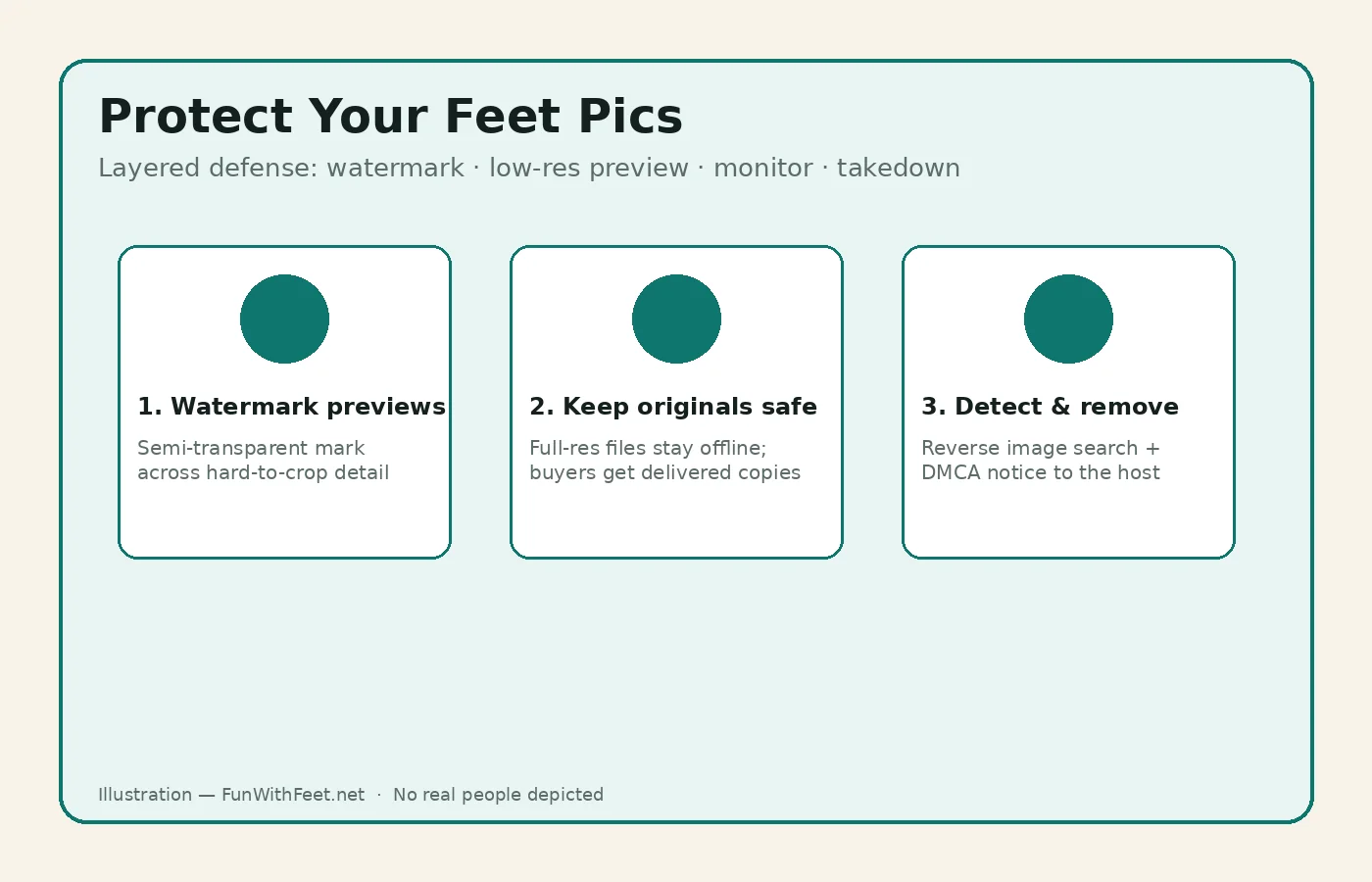
Quick answer: You cannot make theft impossible, but you can make it harder and faster to undo. Publish only low-resolution previews with a crop-resistant watermark, keep full-resolution originals offline, check for copies with reverse image search, and if you find a leak, document it and send a DMCA takedown notice to the host’s designated agent. Under U.S. rules, you do not need Copyright Office registration before sending that notice.
That is the whole defense model: reduce what thieves can grab, mark public versions, keep proof you created the work, watch for copies, and act through the platform or host. The rest of this guide explains each layer, what it is for, and when it does not help. It is practical information for adult sellers — not legal advice for your specific case.
What “protection” can and cannot do
Can do: deter casual reposting, make public previews less useful as free inventory, help you prove which file was yours, and give hosts a clear path to remove copies under the notice-and-takedown system described by the U.S. Copyright Office’s Section 512 resources.
Cannot do: stop a determined person with editing tools, prevent screenshots of paid content, or guarantee a host outside the United States will comply. Watermarks are a deterrent and a tracer, not a force field. Treat every public upload as something that might be copied.
If you are still setting up how you sell, start with the site’s step-by-step selling guide and the anonymous selling overview. Photo technique (light, angles, privacy check before upload) lives in how to take feet pics that sell. This article picks up after the photo exists: how to stop it becoming someone else’s free listing.
Sell on a dedicated marketplace with an anonymous profile and platform-held payments.
Start Selling Feet PicsLayer 1: Control what you publish
Most leaks start with a file that was easier to steal than it needed to be.
Use a separate preview file. Export a smaller web version for public galleries, teasers, and social posts. Keep the full-resolution master on a device or drive you control. Thieves prefer sharp, large files they can resell; a soft preview is less attractive and less convincing as “the real set.”
Do not put identifying clutter in public frames. Mail, reflections, tattoos that also appear on your personal social accounts, and distinctive room landmarks help people connect seller content to a real identity. That is a privacy problem as much as a theft problem. Google’s help material notes that people can sometimes infer location from landmarks in a photo; strip camera location data before anything public leaves your phone (see Apple’s note that sharing a photo can include metadata such as location, and Google Photos’ guidance on photo locations).
Prefer platform messaging for paid deliveries. When a marketplace lets you deliver files inside the app, use that path instead of emailing originals to strangers. You still cannot stop screenshots, but you avoid scattering master files across random inboxes.
Age and consent stay non-negotiable. Only sell photos of your own adult body, or of another adult who clearly agreed to the shoot and to the sale. Content theft response does not fix an illegal or non-consensual upload.
Layer 2: Watermark public previews
A watermark does not create copyright by itself. Copyright in a photo you take usually arises automatically under U.S. law when the work is fixed; the mark is mainly a visible claim and a tracing aid.
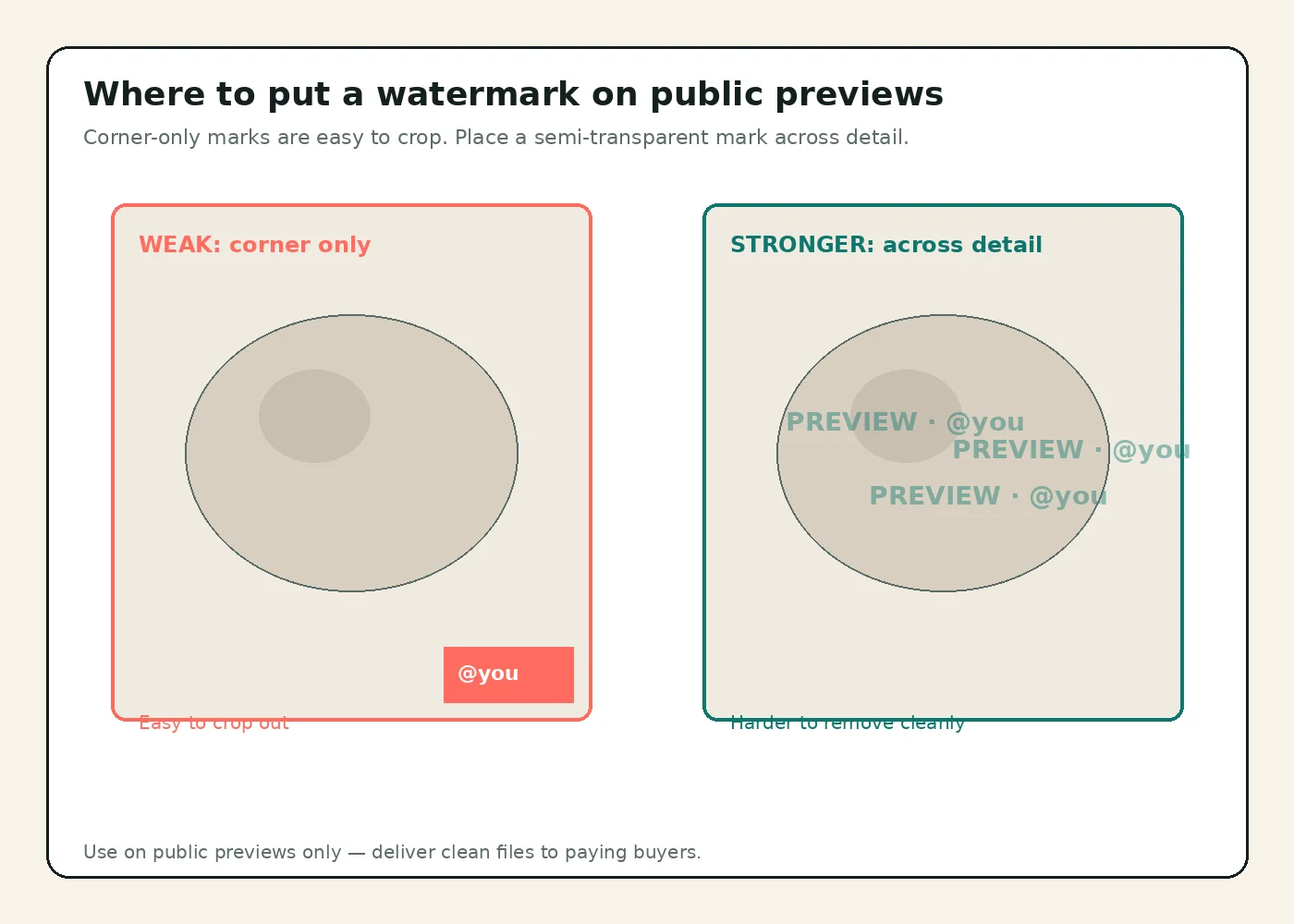
Where to place it. A tiny logo in the bottom corner is the first thing a crop removes. Place a semi-transparent username or “PREVIEW” mark across a detail-rich area of the foot or prop — somewhere cropping would ruin the shot. Opacity in a moderate range (enough to read, not enough to hide the product) usually balances deterrence and sales.
What to write. Use your seller username or a short brand string, not your legal name, home city, or personal email. For high-value customs, some sellers add a tiny buyer-specific code so a later leak can be traced to a delivery; never encode personal data belonging to the buyer either.
When not to watermark. Paying buyers generally expect clean files. Watermark the public preview; deliver the paid file without a heavy mark unless your terms say otherwise. Heavy marks on every paid delivery can hurt reviews and still will not stop screenshots.
Layer 3: Keep proof you made the photo
When you report a stolen copy, the host needs to understand that you own the work.
Keep the original. Save the camera original or the highest-quality export with its capture date. Platforms often strip metadata from re-uploads, so an empty EXIF block on the thief’s copy proves little by itself — your intact original plus dated publication or delivery records is the stronger chain.
Keep a first-publication trail. A dated portfolio post, marketplace listing, or message thread showing when you first offered the set supports “I published this first.” Do not delete your own listing history just to tidy the shop.
Metadata is useful but fragile. Embedding creator or copyright fields can help on files you control. Many social apps strip that data on upload, so do not treat metadata as your only mark of ownership. Pair it with visible preview watermarks and offline originals.
Layer 4: Monitor with reverse image search
Reverse image search uploads or points at a picture and returns pages that use a similar image. No single engine catches every crop, mirror, or collage, so use more than one.
Google: On a computer, go to Google and use Search by image / Lens to upload a file, paste a URL, or drag an image. Google documents the options in Search with an image on Google.
Bing: Open Bing Images, select the camera icon, then upload, paste a URL, or drag a file. Microsoft describes this in Using Bing Visual Search.
How to search smarter
- Start with your full original, then try a tight crop of the distinctive part (pose, jewelry, flooring).
- If you suspect a mirror flip, search a horizontally flipped copy too.
- Search each strong frame from a set, not only the cover shot.
- Keep a private note of the date you searched and the URLs you found.
Cadence. Monthly checks on your best-selling or most-shared previews are a practical minimum. Increase frequency after a viral post or a dispute with a buyer. Reverse search will miss content locked behind logins; also search your username in quotes on major engines.
Privacy caution. Uploading sensitive images to third-party search tools means those services process the file. Prefer searching with the watermarked preview you already made public, not an unreleased custom or ultra-identifying original, when you can.
Layer 5: If you find a copy — document, notify, follow up
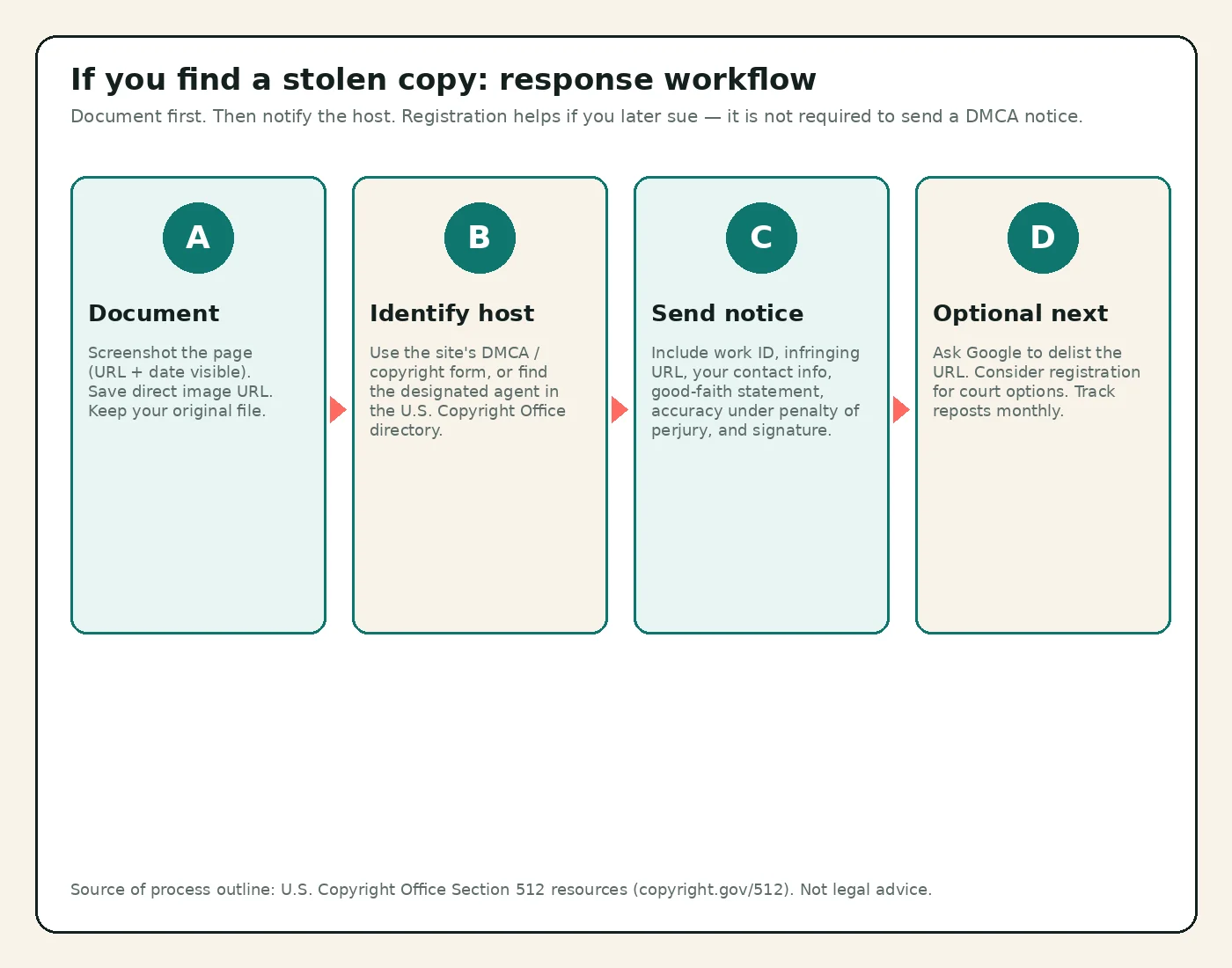
Act in order. Deleting evidence first makes the later notice harder.
Document before you contact anyone
- Full-page screenshot showing the browser address bar, the image, and the date if visible
- Direct URL of the post and of the image file if separate
- Your original file and any listing or delivery proof
- Notes on matching details (shadows, background, jewelry) if the thief added their own watermark
Save copies somewhere stable. People sometimes delete or move posts after they are contacted.
Find the right recipient
Many sites have an in-product “Report” or “Copyright” / “DMCA” form — use it when it exists; it is often fastest. Otherwise, send a notice to the service’s DMCA designated agent. The U.S. Copyright Office DMCA Designated Agent Directory is the official lookup for agents registered with the Office. Agents are also often listed in a site’s terms or a page titled DMCA.
What a DMCA notice must include
The Copyright Office summarizes that an effective notice under Section 512 must include substantially:
- A physical or electronic signature of the copyright owner or authorized agent
- Identification of the copyrighted work (or a representative list if many works on one site)
- Identification of the infringing material and information reasonably sufficient to locate it (usually exact URLs)
- Your contact information
- A statement of good-faith belief that the use is not authorized by the owner, its agent, or the law
- A statement that the information is accurate, and under penalty of perjury, that you are authorized to act for the owner
Those elements are explained on the Office’s Section 512 resource page. The same page states clearly that you do not need to register the work with the Copyright Office before sending a takedown notice, and that you do not need to hire someone to send one if you are the owner or authorized to act.
Misrepresentation has consequences. Knowingly sending a false notice can create liability for damages and fees. If you are unsure whether a use is licensed or fair use, get advice before you assert infringement.
After you send it
Qualifying hosts that want the DMCA safe harbor are expected to act expeditiously to remove or disable access to the material identified in a compliant notice, then notify the uploader. The uploader may file a counter-notice. If that happens, the host may restore the material after a waiting period (the Office describes a window of not less than ten and not more than fourteen business days) unless you notify them that you have filed a court action. Details and sample language live on copyright.gov/512.
You can also ask search engines to delist specific infringing URLs through their copyright removal processes after (or alongside) the host notice. Delisting does not delete the file from the host; removal at the host is still the main goal.
Optional: Copyright registration (when it matters)
Registration is separate from the takedown notice.
- Not required to send a Section 512 notice (Copyright Office FAQ on the 512 page).
- Generally required before you sue for infringement of a U.S. work in federal court (same Office guidance).
- Registration can affect remedies such as statutory damages and attorney’s fees in court, depending on timing and facts — a lawyer can map that to your situation.
- The Office offers group options for photographs (published and unpublished). See Photographs: Registration.
For many sellers, the practical stack is: strong preview hygiene + monitoring + DMCA notices, with registration considered for higher-earning libraries or repeated commercial theft. That priority order is an editorial recommendation, not a legal requirement.
Common mistakes
- Watermarking only the corner of every preview, then wondering why cropped reposts look clean
- Uploading full-resolution masters as “teasers”
- Watermarking paid deliveries so heavily that buyers complain, while leaving public previews unprotected
- Skipping documentation and arguing from memory after the post disappears
- Assuming registration is required before you can send a DMCA notice (it is not, per the Copyright Office)
- Sending incomplete notices without exact URLs or the required statements
- Ignoring anonymity basics while focusing only on watermarks — account email, face, and room details still leak identity
FAQs
Does a watermark stop people from stealing feet pics?
No. It deters casual theft and makes some copies easier to recognize. Determined people can crop, clone, or screenshot. Use watermarks on public previews together with low resolution, monitoring, and takedowns.
Do I need to register my photos before filing a DMCA takedown?
No. The U.S. Copyright Office states that copyright registration is not required before sending a takedown notice. Registration matters more if you later want to sue in court over a U.S. work.
Should I watermark the files I send to paying buyers?
Usually not with a heavy public-style mark. Watermark previews; deliver clean paid files unless your terms say otherwise. Screenshots of paid content are still possible either way.
How do I find stolen feet pics online?
Run the same image through more than one reverse image search tool (for example Google’s search-by-image / Lens and Bing Visual Search), try crops and mirrors, and search your seller username in quotes. Repeat on a schedule for your best sets.
What if the site ignores my DMCA notice?
Compliance is tied to the host’s interest in safe-harbor protection; not every host responds. Confirm you used a complete notice and the correct designated agent, try the platform’s official form, consider search-engine delisting for the URL, and speak with a lawyer about options in the relevant country if the copy stays up.
Can I DMCA a photo of me that I did not take?
Only the copyright owner (typically the person who took the photo) or their authorized agent can use the Section 512 notice for that photo. If someone else pressed the shutter, copyright remedies may not be available to you; other laws or platform rules might apply. The Copyright Office discusses this distinction on the 512 FAQ page.
Is reverse image search safe for sensitive content?
You are uploading or pointing a third party at the image. Prefer searching with previews you already published publicly. Avoid uploading unreleased customs you have not yet decided to distribute.
Quick checklist
- Public teasers are low-resolution and free of identifying clutter
- Public previews carry a crop-resistant watermark with your seller name only
- Full-resolution originals stay under your control
- Location metadata stripped before public upload
- Monthly (or tighter) reverse image search on top sets
- Evidence pack ready: original file + screenshots + URLs
- DMCA / copyright report path bookmarked for each platform you use
- Optional: photograph group registration considered for valuable libraries
Protecting feet pics is less about one magic tool and more about repeating a short routine: publish carefully, mark previews, keep proof, watch for copies, and send complete notices when something slips through.